
Home > For Samsung Laptop Batteries > For Samsung AA-PBSN4AT Battery
Replacement 54Wh 15.4V AA-PBSN4AT Battery For Samsung Galaxy Book NP750TDA-XD1US NP750TDA-XD2US
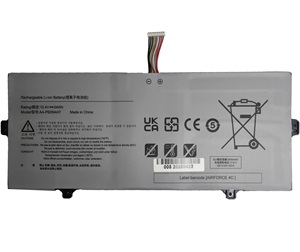
For Samsung AA-PBSN4AT Battery


Replacement For Samsung AA-PBSN4AT Battery - 54Wh 15.4V
New AA-PBSN4AT Battery for Samsung Galaxy Book NP750TDA-XD1US NP750TDA-XD2US.100% original manufacturer compatible.Manufactured of high quality long life battery cells.Full one year warranty and 30 days money back!

Item name:For Samsung AA-PBSN4AT Battery
Availability: In Stock
AU $ + Shipping Rate
Replacement AA-PBSN4AT Battery For Samsung Galaxy Book2 NP641BE NP641BED
- Warranty
- 12 months
- Capacity
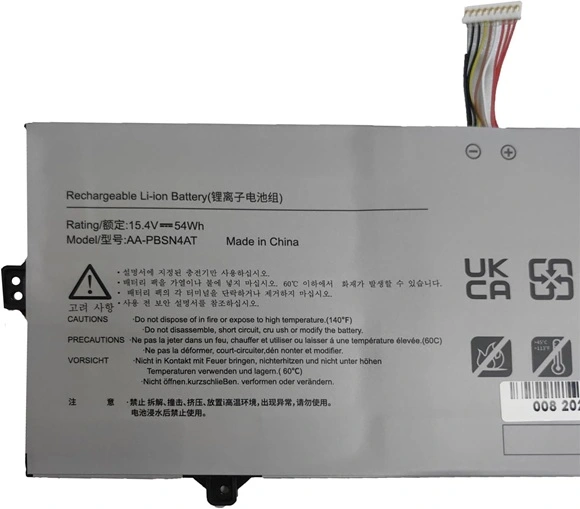
- 54Wh
- Volts
- 15.4V
- Color
- White
15.4V, 54Wh Extended Life battery for Samsung AA-PBSN4AT. The quality of this for Samsung AA-PBSN4AT battery is certified as well by RoHS and the CE to name a few. Cheap price and high quality!
Safety is also key with for samsung batteries, therefore all laptop battery for Samsung AA-PBSN4AT have top quality 100% Grade "A" cells for premium capacity and reliability and 5 levels of protection including a failsafe thermal switch.
Replacement Battery Code:
Replacement For:AA-PBSN4AT, BA43-00391B, 4ICP5/43/97
Fits model:
Replacement For : SAMSUNG Galaxy Book NP750TDA-XD1US NP750TDA-XD2US
Samsung Galaxy Book 15.6" NP750TDA Series, for Samsung Galaxy Book 15.6" NP750XDA Series, for Samsung Galaxy Book 15.6" NP755XDA
Features:
- High quality and rechargeable ( between 400 to 600 charge-discharge cycle).
- Product Type : Replacement Laptop Battery ,100% compatible with the Original Samsung AA-PBSN4AT battery.
- Memory effect : No memory effect with li-thium battery
- This Replacement battery for Samsung AA-PBSN4AT has been tested and validated on acer systems to ensure it will work with your notebook.
- Long battery life and maximum power, quick-charging!
- Condition : New brand, High quality,1 year warranty, 30 days money back!
mAh Milliamp Hour
mAh Milliamp Hour - It is the measure of a battery's total capacity. The higher the number the more charge a battery can hold and the longer a battery will last under a certain load.
Instruction for Use:
1) For the first time using the new battery,please discharge it to 5% and the fully charge it to 100%.
2) Never run your battery below the 2% critically low warning point. If your battery is run below this point it may not have enough energy to even recharge. This may effectively 'kill' your Samsung AA-PBSN4AT battery.
3) If you plan to place your laptop battery in storage, be sure to have the charge at 40% and stored in the fridge (not freezer) for maximum laptop battery longevity.
4) Make your laptop into sleep or hibernate when the notebook is not in use.
5) Choose correct laptop adapter,if a replacement battery is not charged,perhaps your adapter can not be compatible with it.
All brand names & logos & trademarks are the property of their respective holders and are referred to here for descriptive purpose only. The listed brand names and model designations are intended only to show the compatibility of these products with various machines. We are therefore in no way associated with these companies.We do not sell original name-brand laptop batteries. Use of the site constitutes acceptance of our Terms and Conditions.

No Worries Warranty!
1 Year Product Warranty!
60 Days Money Back Guarantee!
100% RISK-FREE!
Our Goal is 100% Customer Satisfaction and Customer Success.
Laptop Battery
-
Replacement For :
- Battery For Acer
- Battery For Amazon
- Battery For Asus
- Battery For Benq
- Battery For Clevo
- Battery For Dell
- Battery For Huawei
- Battery For HP/Compaq
- Battery For Lenovo
- Battery For Microsoft
- Battery For MSI
- Battery For Panasonic
- Battery For Razer
- Battery For Samsung
- Battery For Sony
- Battery For Toshiba
Laptop AC Adapter
- For Acer AC Adapter
- For Asus AC Adapter
- For Chicony AC Adapter
- For Dell AC Adapter
- For Delta AC Adapter
- For HP AC Adapter
- For LG AC Adapter
- For Microsoft AC Adapter
- For Lenovo AC Adapter
- For Sony AC Adapter
- For Samsung AC Adapter
- For Toshiba AC Adapter
Top 15 Battery
-
Replacement For :
- HP AE03XL
- Dell MXV9V
- Dell FK0VR
- Dell 293F1
- Dell MV07R
- Lenovo L22M3P71 Battery
- dell JK6Y6 battery
- dell WY9DX
- Lenovo L21M4PG1 Battery
- Dell XG4K6
- Lenovo L18M4PH0
- HP PP03XL
- Samsung aa-plxn4ar
- Lenovo L18M3P72 battery
- AA-PBRN4ZU


