
Home > For Toshiba Laptop Batteries > For Toshiba PS0123NA1BRS Battery
Replacement For 48.7Wh 15.4V Toshiba PS0123NA1BRS Battery
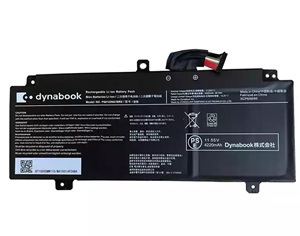
For Toshiba PS0123NA1BRS Battery


Replacement PS0123NA1BRS Battery For Toshiba Dynabook PS0123NA1BRS- 48.7Wh 15.4V
Replacement PS0123NA1BRS 48.7Wh Battery for Toshiba Dynabook PS0123NA1BRS.100% original manufacturer compatible.Manufactured of high quality long life battery cells.Full one year warranty and 30 days money back!

Item name: For Toshiba PS0123NA1BRS Battery
Availability: In Stock
AU $ + Shipping Rate
Replacement For Toshiba PS0123NA1BRS Battery
- Warranty
- 12 months
- Capacity
- 48.7Wh
- Volts
- 15.4V
- Color
- Black
15.4V, 48.7Wh battery for Toshiba PS0123NA1BRS. The quality of this for Toshiba PS0123NA1BRS battery is certified as well by RoHS and the CE to name a few. Cheap price and high quality!
Safety is also key with for toshiba laptop batteries, therefore all laptop battery for Toshiba PS0123NA1BRS have top quality 100% Grade "A" cells for premium capacity and reliability and 5 levels of protection including a failsafe thermal switch.
Replacement Battery Code:
Replacement For:PS0123NA1BRS
Fits model:
Replacement For :
Toshiba Dynabook PS0123NA1BRS
Attention
- 100% Brand New ,High Quality Battery Cells
- Item is 100% OEM Compatible
- No memory effect. Chargeable even if it has not been used up yet
- Run Longer Time,Best Replacement for the original Toshiba PS0123NA1BRS Battery
Top Quality
The batteries we sell comes with worlds best quality Japaneese Cells.
Power your Laptop with our Excellent For Toshiba PS0123NA1BRS Battery.Any battery or accessory you purchase from us is guaranteed,Our laptop battery are made by the highest quality Japaneese cells available and utilize all of the proper logic boards, thermal protectors, thermistors and circuit breakers to ensure the highest levels of battery safety, reliability and efficiency,it is Certified by CE and RoHS! you can be reassured to buy it.
Purchase Skills
Please open the back cover of the laptop before ordering and make sure that the original battery model is consistent with the listing. After getting the battery, please install the battery correctly, make sure that the battery connector is firmly connected to the laptop motherboard, and use the original charger to charge the laptop.
Battery Optimal Maintenance
New asus laptop battery received, discharge the battery to 5% (not 0%) for the fist use, then charge and cycle 3-4 times to wake up the new battery.
Do not connect adapter for a long time while using the battery. It may damage the battery.
Do not run out of battery power to 0%, the lithium battery will turn on the Charge Protection. So it can not be recharged any more.
If the battery needs to remain idle in a month or a longer time, remove the battery out of the computer, charge it to 60%-80% and store it in a dry cool and clean place.
Laptop Battery
- Battery For Acer
- Battery For Amazon
- Battery For Asus
- Battery For Benq
- Battery For Clevo
- Battery For Dell
- Battery For Huawei
- Battery For HP/Compaq
- Battery For Lenovo
- Battery For Microsoft
- Battery For MSI
- Battery For Panasonic
- Battery For Razer
- Battery For Samsung
- Battery For Sony
- Battery For Toshiba
Laptop AC Adapter
- For Acer AC Adapter
- For Asus AC Adapter
- For Chicony AC Adapter
- For Dell AC Adapter
- For Delta AC Adapter
- For HP AC Adapter
- For LG AC Adapter
- For Microsoft AC Adapter
- For Lenovo AC Adapter
- For Sony AC Adapter
- For Samsung AC Adapter
- For Toshiba AC Adapter
Top 15 Battery
- asus C41N1901 battery
- asus C41N1716
- asus B31N1842
- C31N1811
- Asus C21N1347
- Asus C41N1904
- asus c41n1731
- Asus C31N1905
- Asus C31N1912<
- Asus C31N2201 Battery
- Asus C22N2207 Battery
- C31N1911
- Asus c41n2013 Battery
- Asus UX360U battery


